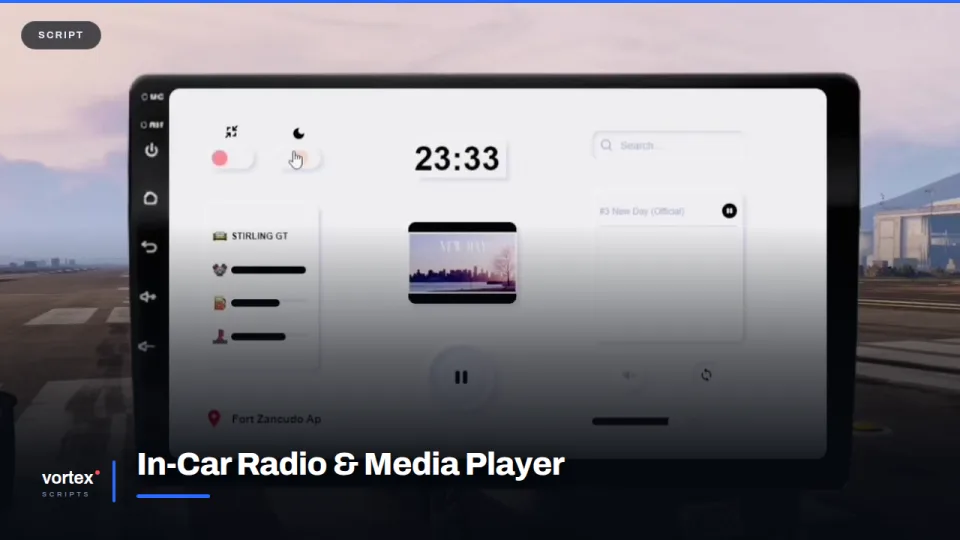
Music on a server is usually one person hearing something nobody else does. A shared head unit fixes that, and it turns a car park into somewhere people stand around.
The unit
It mounts in the dash of any vehicle and opens as a touchscreen: search, queue, play, pause, volume, loop and mute, with a clock and the current location along the bottom. It is shaped like a real aftermarket head unit rather than a browser window, so it reads as part of the car.
Everyone hears it
Playback is synced. Passengers hear what the driver picked, and people on the pavement hear it as they walk past. Volume falls away with distance, which means a car with the windows down is something you notice from across the street rather than a private stream.
Light and dark
The interface has both and follows the time of day, so a night drive does not come with a white screen in your face.
Fitting it in
Works on any vehicle with no per-model setup, and runs on ESX, QBCore and Qbox. Whether the unit comes as standard or has to be fitted is a config switch.
In-Car Radio & Media Player installation for FiveM servers
In-Car Radio & Media Player is a FiveM script from Vortex Scripts in the FiveM Vehicle Scripts category. After checkout, download the resource package from your Vortex Scripts order email, upload the included folder to your server, and start it from server.cfg.
resources/ directory.
ensure line using the exact folder name shipped in the download.
Use this as the server.cfg pattern, with the placeholder swapped for the folder name your download unpacks as:
ensure your-resource-folderThe folder name is controlled by the download package itself, not by this product page — keep whatever the archive contains.
Why In-Car Radio & Media Player fits a FiveM server
Framework labels for this listing: esx, qbcore, qbox. Check the included readme for any product-specific setup notes.
In-Car Radio & Media Player compatibility and purchase details
Write a review
Reviews are moderated before appearing. Purchased the product? Your review gets a VERIFIED badge automatically.
Related scripts
About this FiveM script
In-Car Radio & Media Player is a premium FiveM script for esx, qbcore, qbox servers. It’s part of the Vortex Scripts catalog, a curated selection of battle-tested resources for QBCore, ESX and Qbox roleplay servers. Every script we sell ships with lifetime updates, instant email delivery, and email support for technical questions.
It installs as a standard FiveM resource: unzip it into your resources folder, add it to your server.cfg, and restart. The config-first design means you can change prices, permissions and locations without editing the core Lua.
Framework fit for this listing: esx, qbcore, qbox. Check the included readme for any setup notes specific to this resource. Licence and refund terms are set out in our terms.