

Advanced HUD V7
Advanced HUD V7 is a clean, flexible HUD for FiveM — and it's completely free. It gives players full control over how their on-screen information looks and where it sits, while keeping things optimized for smooth performance.
Features
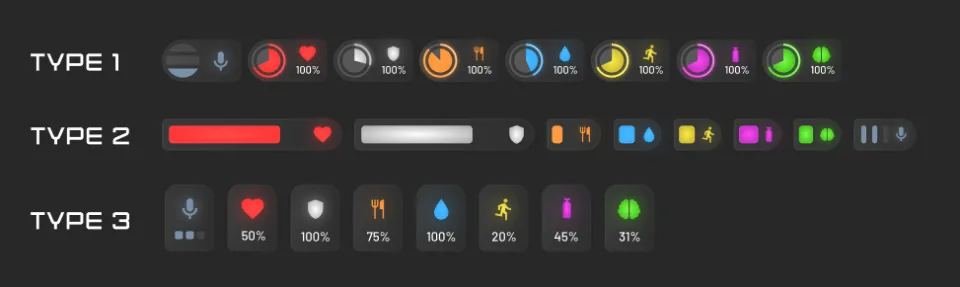
- Choose from 3 status display settings and 4 speedometer styles directly in the HUD settings.
- Reposition every HUD element to sit exactly where you want it on screen.
- Customize the status colors to match your server's theme.
- Switch between KM and MP speed measurement units.
- With Speedometer Type 2, view the recorded mileage of vehicles stored in the data.
- Adjust the HUD load time to suit your setup and keep it running optimized.
Showcase
Free to download from Vortex Scripts, with continued updates and support whenever you need it.
Advanced HUD V7 installation for FiveM servers
Advanced HUD V7 is a FiveM script from Vortex Scripts in the ESX Scripts category. After checkout, download the resource package from your Vortex Scripts order email, upload the included folder to your server, and start it from server.cfg.
resources/ directory.
ensure line using the exact folder name shipped in the download.
Use this as the server.cfg pattern, with the placeholder swapped for the folder name your download unpacks as:
ensure your-resource-folderThe folder name is controlled by the download package itself, not by this product page — keep whatever the archive contains.
Why Advanced HUD V7 fits a FiveM server
Framework labels for this listing: esx, qbcore, qbox. Check the included readme for any product-specific setup notes.
Advanced HUD V7 compatibility and purchase details
Write a review
Reviews are moderated before appearing. Purchased the product? Your review gets a VERIFIED badge automatically.
Related scripts












About this FiveM script
Advanced HUD V7 is a free FiveM script for esx, qbcore, qbox servers. It’s part of the Vortex Scripts catalog, a curated selection of battle-tested resources for QBCore, ESX and Qbox roleplay servers. Every script we sell ships with lifetime updates, instant email delivery, and email support for technical questions.
It installs as a standard FiveM resource: unzip it into your resources folder, add it to your server.cfg, and restart. The config-first design means you can change prices, permissions and locations without editing the core Lua.
Framework fit for this listing: esx, qbcore, qbox. Check the included readme for any setup notes specific to this resource. Licence and refund terms are set out in our terms.