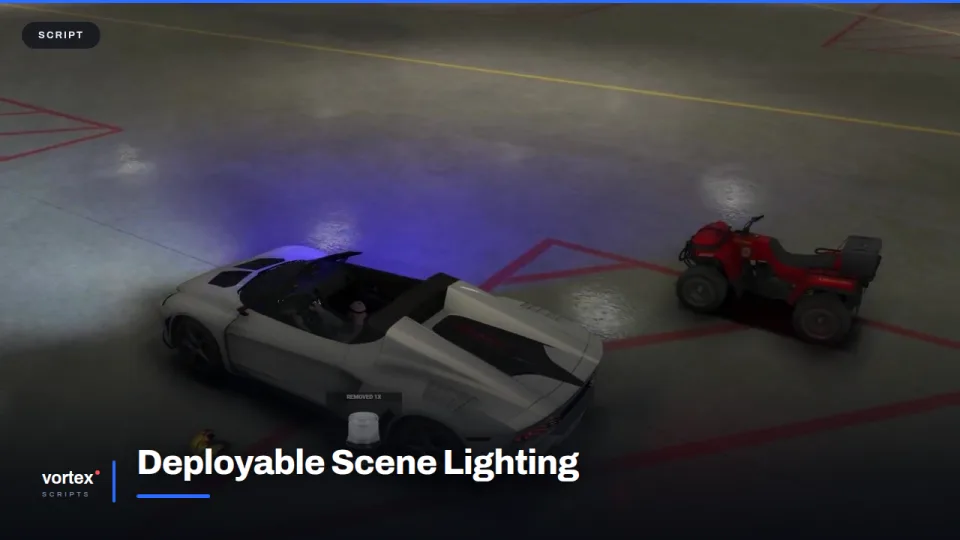
A road closure only looks like a road closure when something is lighting it. Without that, a collision scene is three cars parked at odd angles in the dark and a lot of people typing.
Placing a lamp
The lamp is an inventory item. Take it out, set it on a vehicle roof or stand it on the tarmac, and it starts turning. Blue, red and amber are all there, so one item covers a police cordon, a fire ground and a recovery job instead of three separate scripts.
Taking it back
Lamps are picked up the way they went down, and they belong to whoever placed them. That matters more than it sounds — scenes clear properly instead of leaving a field of orphaned props for an admin to sweep up at the end of the night.
Where it earns its keep
Night shifts, motorway closures, and any scene that has to hold for a while. It also gives traffic officers something to do with their hands while recovery is en route, which is usually where the roleplay actually happens.
Fitting it in
No framework lock-in: ESX, QBCore and Qbox all work, and because the lamp is a normal item your existing inventory handles it. Colours, placement distance and how many a player may carry are config.
Deployable Scene Lighting installation for FiveM servers
Deployable Scene Lighting is a FiveM script from Vortex Scripts in the FiveM Police & EMS Scripts category. After checkout, download the resource package from your Vortex Scripts order email, upload the included folder to your server, and start it from server.cfg.
resources/ directory.
ensure line using the exact folder name shipped in the download.
Use this as the server.cfg pattern, with the placeholder swapped for the folder name your download unpacks as:
ensure your-resource-folderThe folder name is controlled by the download package itself, not by this product page — keep whatever the archive contains.
Why Deployable Scene Lighting fits a FiveM server
Framework labels for this listing: esx, qbcore, qbox. Check the included readme for any product-specific setup notes.
Deployable Scene Lighting compatibility and purchase details
Write a review
Reviews are moderated before appearing. Purchased the product? Your review gets a VERIFIED badge automatically.
Related scripts


About this FiveM script
Deployable Scene Lighting is a premium FiveM script for esx, qbcore, qbox servers. It’s part of the Vortex Scripts catalog, a curated selection of battle-tested resources for QBCore, ESX and Qbox roleplay servers. Every script we sell ships with lifetime updates, instant email delivery, and email support for technical questions.
It installs as a standard FiveM resource: unzip it into your resources folder, add it to your server.cfg, and restart. The config-first design means you can change prices, permissions and locations without editing the core Lua.
Framework fit for this listing: esx, qbcore, qbox. Check the included readme for any setup notes specific to this resource. Licence and refund terms are set out in our terms.