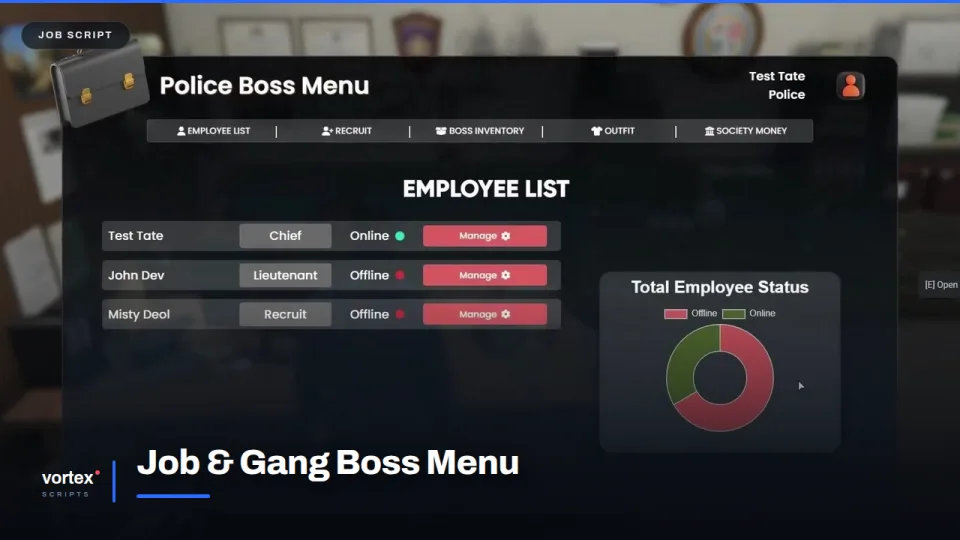
Every organisation on a server needs the same five things, and most servers end up with five different menus doing them badly. This is one screen that covers the lot.
Staffing
The employee list shows who is on the books, what rank they hold and whether they are online right now, with a status breakdown beside it. Recruiting happens on the same screen: nearby players appear in a list, or they apply through a form and the boss works the queue.
Ranks and permissions
Ranks are defined per organisation and carry what each one may do, so a lieutenant can hire but not dismiss and a recruit can do neither. Promotions and dismissals are two clicks, which matters when a shift changes over.
Shared kit and money
A boss inventory holds equipment the whole team draws from, outfits are set per rank, and the society balance sits on the same screen rather than behind a command nobody remembers.
Fitting it in
Police, medical, mechanics and criminal organisations all run from one config, so adding an eleventh job does not mean adding an eleventh menu. ESX, QBCore and Qbox.
Job & Gang Boss Menu installation for FiveM servers
Job & Gang Boss Menu is a FiveM script from Vortex Scripts in the FiveM Job & Career Scripts category. After checkout, download the resource package from your Vortex Scripts order email, upload the included folder to your server, and start it from server.cfg.
resources/ directory.
ensure line using the exact folder name shipped in the download.
Use this as the server.cfg pattern, with the placeholder swapped for the folder name your download unpacks as:
ensure your-resource-folderThe folder name is controlled by the download package itself, not by this product page — keep whatever the archive contains.
Why Job & Gang Boss Menu fits a FiveM server
Framework labels for this listing: esx, qbcore, qbox. Check the included readme for any product-specific setup notes.
Job & Gang Boss Menu compatibility and purchase details
Write a review
Reviews are moderated before appearing. Purchased the product? Your review gets a VERIFIED badge automatically.
Related scripts









About this FiveM script
Job & Gang Boss Menu is a premium FiveM script for esx, qbcore, qbox servers. It’s part of the Vortex Scripts catalog, a curated selection of battle-tested resources for QBCore, ESX and Qbox roleplay servers. Every script we sell ships with lifetime updates, instant email delivery, and email support for technical questions.
It installs as a standard FiveM resource: unzip it into your resources folder, add it to your server.cfg, and restart. The config-first design means you can change prices, permissions and locations without editing the core Lua.
Framework fit for this listing: esx, qbcore, qbox. Check the included readme for any setup notes specific to this resource. Licence and refund terms are set out in our terms.