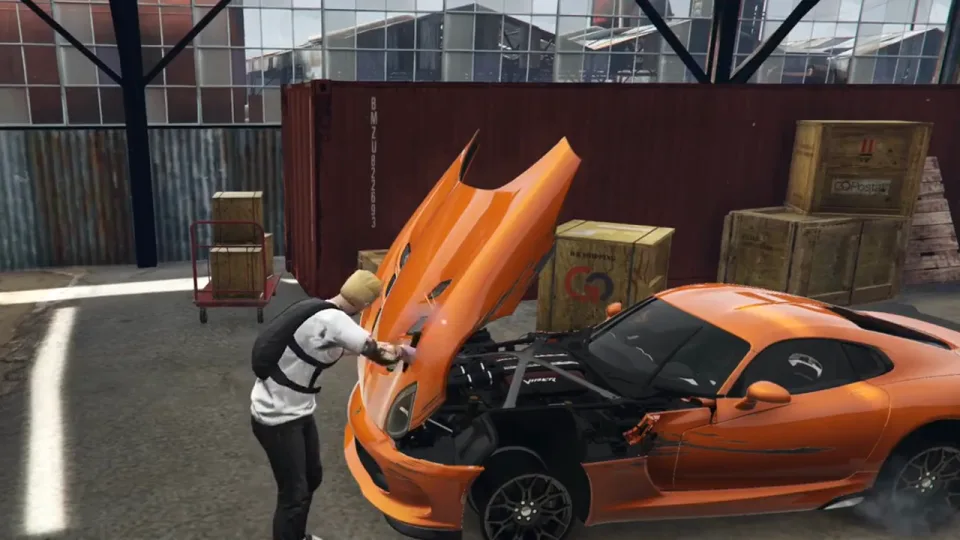
Most car-theft jobs end the moment the car is delivered. This one gives the car somewhere to go. A crew buys one of five garages around the map, and everything they steal after that builds the business.
The garage is the base
Buying in plays a short cutscene with a contact who explains how the shop runs, then hands over a laptop in the middle of the floor. The laptop shows how many cars the garage has earned over its life and how many it holds right now. Set a door code so friends can come in and look at the collection without touching the laptop, and add members up to the cap you have paid for.
Contracts, not random spawns
Ask the laptop for a job and an email arrives with a search area for the car. Find it, get in, and get it back before the police arrive: a dispatch call goes out when the job starts, and the chance of that call is config. The car goes into a storage slot, where damage from the trip can be repaired for a price before it is broken down. Spawned cars are held so they do not vanish mid-job.
Taking it apart
Drive the car to one of eight drop-offs and pull it apart piece by piece: doors, hood, trunk and wheels each come off as an inventory item, and the stripped shell pays out when it is finished. Trunks can be searched on the way, with rare drops that only open up once the garage has earned enough cars overall.
What the garage unlocks
The garage starts with five vehicle slots and one member. Slots and members are bought with in-game money, and the room itself fills in as you go:
- Clothing change and a storage locker
- A crafting bench and a welding bench that turns parts into money and scrap
- An arcade machine with hacking puzzles
- A printer for rare items
Fitting it in
ESX or QBCore, set in one line of config. It needs PolyZone and oxmysql, a target resource (qb-target or ox_target), a menu (qb-menu or ox_lib) and your inventory; phone email, dispatch, notifications and on-screen text are thin functions in one open file, set up for common resources and easy to point at your own. One SQL table, four part items plus a tracker-removal item, and optional sound files. Prices, payouts, cooldowns, upgrade costs, pickup spots and the car list are all config, and admins get commands to jump to each garage.
Player-Owned Chop Shop installation for FiveM servers
Player-Owned Chop Shop is a FiveM script from Vortex Scripts in the FiveM Vehicle Scripts category. After checkout, download the resource package from your Vortex Scripts order email, upload the included folder to your server, and start it from server.cfg.
resources/ directory.
ensure line using the exact folder name shipped in the download.
Use this as the server.cfg pattern, with the placeholder swapped for the folder name your download unpacks as:
ensure your-resource-folderThe folder name is controlled by the download package itself, not by this product page — keep whatever the archive contains.
Why Player-Owned Chop Shop fits a FiveM server
Framework labels for this listing: esx, qbcore. Check the included readme for any product-specific setup notes.
Player-Owned Chop Shop compatibility and purchase details
Write a review
Reviews are moderated before appearing. Purchased the product? Your review gets a VERIFIED badge automatically.
Related scripts


About this FiveM script
Player-Owned Chop Shop is a premium FiveM script for esx, qbcore servers. It’s part of the Vortex Scripts catalog, a curated selection of battle-tested resources for QBCore, ESX and Qbox roleplay servers. Every script we sell ships with lifetime updates, instant email delivery, and email support for technical questions.
It installs as a standard FiveM resource: unzip it into your resources folder, add it to your server.cfg, and restart. The config-first design means you can change prices, permissions and locations without editing the core Lua.
Framework fit for this listing: esx, qbcore. Check the included readme for any setup notes specific to this resource. Licence and refund terms are set out in our terms.